Integrated payment gateways so you can focus on selling: Everything you need to know

In our previous article, we explained how integrated payment gateways on GlobalLinker’s ecommerce platform, facilitate easy online transactions on your e-store.
In this article we will explain:
- Application and activation process for payment gateway
- KYC requirements post payment gateway activation
- Currencies, payment methods supported and advanced features
- Payment gateway account management
- FAQs related to payment gateway providers on GlobalLinker’s ecommerce platform
Application process
Before you start with the application process you need to ensure your line of business is eligible for accepting online payments.
Most payment gateways does not support certain businesses. Here is a list by CCAvenue www.ccavenue.com/faq_ccav.jsp
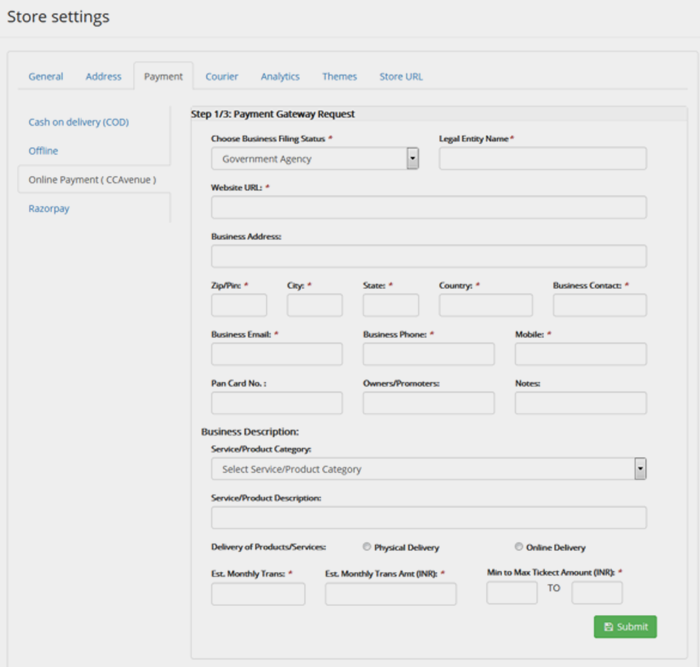
Step 1: Apply for payment gateway
Fill in basic business details to apply for payment gateway. Razorpay supports instant activation in most business categories where as CCAvenue will take about 2 to 5 working day to get your account activated.
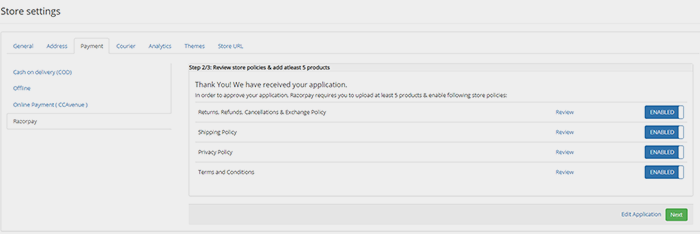
Step 2: Review store policies and add at least 5 products
In order to approve your application, payment gateway requires you to upload at least 5 products and enable basic store policies. This step and information are a prerequisite for payment gateway provider to verify the line of business and customer policies which is mandatory for risk approval from banks. For your ease we have pre-drafted the policies for you, however we strongly recommend that you read each one carefully and make necessary amendments before enabling them.
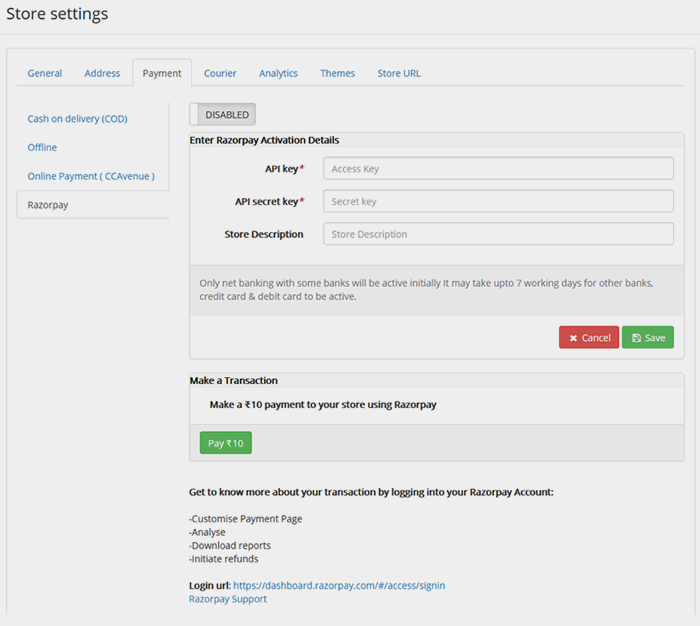
Step 3: Submit API keys to activate payment gateway on your store
Once your account application is submitted, your account will get activated either instantly or within 2 – 5 working days depending on payment gateway provider and business category.
Once you account is activated:
- Login to your Payment Gateway account to get the API keys.
- Submit these keys to enable the payment gateway and start accepting online payments.
- Once the payment gateway is activated on your store, and if you are using Razorpay you can make an INR 10 transaction to test proper integration
KYC requirements post activation
Activating your account enables you to start receiving payments from your customers. However, the pay out to your bank account will be processed only after you complete the KYC process with the payment gateway provider.
Below are the list of documents required for payment gateway verification depending on your business type:
CCAvenue:
Photo proof - Pan card copy, passport copy, driving license or election card)
Office address proof - For own property - Electricity bill, For rental property - rent agreement copy & electricity bill, Bank Account : Statement OR Passbook
Cancelled cheque - For the bank account into which you will be receiving payments.
Financial proof - Current Account statements for last 12 months with bank seal and bank logo. OR Audited balance sheet with P & L account statements for last 2 years.
Additional Documents - For the below business entities, please see https://www.ccavenue.com/document_reqd.htm
- Sole Proprietor
- Partnership / LLP Firm
- Public limited / Private Limited
- Others (NGO / Government / Education / Society)
- Individual (No additional documents required)
Razorpay:
Proof of business - Certificate of Incorporation, Partnership Deed, Service Tax, GST registration document
Firm/Company PAN (Not for Proprietorship)
Promoter's PAN - Proprietor/Director
Cancelled cheque / Bank account statement in the name of the business
Authorised signatory address proof (Passport/AADHAR/DL/EC)
Currencies, Payment Methods Supported and Advanced Features
-
Currencies Supported
For sellers who want to sell their products overseas, payment gateways offer multi-currency support for payments made through cards issued by overseas banks for all the major networks like Visa, Mastercard and Amex.
To avail multi-currency you can raise a request to info@linker.store and we will get in touch with you for assistance.
Read below to know more about the foreign currencies supported by each payment gateway (including INR, USD, EUR and SGD)
CCAvenue supports 27 currencies, details as mentioned here
Razorpay supports 92 foreign currencies, details as mentioned here
-
Payment Methods Supported
Accept payments through all leading methods such as debit cards, credit cards, wallets, EMI/Pay Later and UPI are supported.
https://razorpay.com/payment-gateway/#methods
-
Features: Invoice Creation
For offline orders/transactions you can generate both GST-complaint and non-GST Invoices/payment link using which your customers can make online payments.
To know more on how to create an invoice on Razorpay dashboard click on this link
Payment Gateway Account Management
Once you have started receiving online payments, it’s important to know how to manage the payment gateway account for performing activities such as verifying payment status, processing refunds and creating invoices.
How to read Order Payment Status on GlobalLinker’s ecommerce platform
Order status are of following types:
1. Payment Successful
Successful transaction ready for order fulfillment
2. Payment Pending
Pending transaction status can mean one of the following 3 scenarios:
- Customer drop off from payment page and has to reattempt the payment
- Amount has been deducted from customers account but there is delay in confirmation response from bank or payment gateway. In such cases you should wait up to 24 hours for status to update. If the status does not update, you can check raise this issue with payment gateway provider.
- Customer has made the payment however either closed the browser or because of disruption of internet connectivity process could not be completed. In such case order will show as successful on payment gateway but pending on seller panel. Thus it is advised that you review your payment gateway dashboard every day to avoid any such accidental misses.
3. Payment Failed
Payment attempted has failed or rejected from bank and has to be reattempted. Order cannot be fulfilled.
Further if you are still unsure of you can cross check payment status on your payment gateway account. Details are as follows:
Payment Settlement Cycle for successful transactions
For domestic transactions the payment settlement is processed to your bank account in T+2 days.
For International transactions the settlement period is T+7 days.
Note: Post KYC verification, payout to bank account will begin only once amount due is more than INR 500.
Payment Gateway FAQs
To know more refer to payment gateway FAQs given below
https://www.ccavenue.com/faq_ccav.jsp
https://razorpay.com/knowledgebase/
Processing and receiving payment is a simplified process thanks to integration of payment gateways with banks and GlobalLinker’s ecommerce platform. Our team of experts are always happy to help you with any clarification or help you might need. We are with you from your first payment to many more!
Related articles
- You are 5 steps away from setting up your online store with GlobalLinker’s ecommerce platform
- How to customise your ecommerce store’s domain name to stand out
- 7 ways to write product descriptions that sell
Image source: shutterstock.com
We are a team of experienced industry professionals committed to sharing our knowledge and skills with small & medium enterprises.